Google Analytics and Search Console MCP server, hosted
Add one connector to claude.ai, Claude Desktop, Claude Code, Cursor or any MCP client and your AI can query every property you can access. Same tools as the built-in chat, your permissions on every call, nothing to host.
Every plan. Free includes 300 tool calls a month per team.
One question, four tool calls, a cited answer
Your client decides which tools to call. Each call passes through AI Data Stream, which checks who you are and what you may see on that property, reads the connected source, and hands the result back.
Sessions on the harbour site are down 27% this month. Should I worry?
-
get-traffic-dataGA4 -
get-traffic-sourcesGA4 -
get-recent-annotationsAnnotations -
search-analyticsSearch Console
Not a real drop. The earlier month includes the scraper you challenged on 16 Sep: direct traffic fell from 745 to 305 sessions and its bounce rate from 88% to 56%.
Real visitors grew. Google organic is up 59% (251 → 399), and the September spam update left no mark. Your 26 Sep title rewrite is working:
Impressions are falling with the end of the season, so clicks held level while CTR climbed.
sources · GA4 · Search Console · Annotations
A real session on one of our own sites, run through the connector on 16 Oct 2026. The tool calls are the ones that ran.
Google Analytics 4 through MCP
Any report GA4 can run, from your AI: sessions and users over time, traffic sources, landing pages, key events, a realtime snapshot, and a like-for-like comparison of two periods. Annotations sit alongside, so the answer can say what changed on the day the line moved.
run-reportrun-realtime-reportget-traffic-dataget-traffic-sourcesget-top-pagescompare-periodslist-key-events
Ask things like
- “Compare this month with the same month last year by channel.”
- “Which landing pages lost sessions after the 26 Sep change?”
- “What is on the site right now?”
Search Console through MCP
Clicks, impressions, CTR and position for any date range, grouped by query, page, country, device, date or search appearance, with filters on any of them, across web, image, video, news, Discover and Google News. Inspect a URL’s index status and list the sitemaps you have submitted.
search-analyticsindex-inspectlist-sitemaps
Ask things like
- “Which queries rank 5 to 15 with the most impressions?”
- “Did the title rewrite lift CTR on the marina pages?”
- “Is /movements indexed, and when was it last crawled?”
Google Analytics and Search Console are on the Free plan. Connect them once in the app and the connector sees them.
Every other source, the same way
One connector covers every property you can access across all your teams. Your AI sees only the sources each property has connected, and can run the team’s saved skills from the prompts menu.
- claude.ai
- Claude Desktop
- Claude Code
- Cursor
- Any MCP client
https://app.aidata.stream/mcp Google Analytics 4
-
get-traffic-data -
run-report -
get-top-pages
Search Console
-
search-analytics -
index-inspect -
list-sitemaps
Google Ads
-
get-search-terms-report -
get-quality-score
Meta & LinkedIn Ads
-
meta-ads-campaign-performance -
linkedin-ads-audience-breakdown
PageSpeed & Core Web Vitals
-
get-page-speed -
get-web-vitals-snapshot
WordPress & GitHub
-
wordpress _list _ posts -
github _recent _ commits
Cloudflare
-
cloudflare-ai-crawler-activity -
cloudflare-ai-referrals
Tag Manager
-
gtm-list-tags -
gtm-list-triggers
HubSpot & Pipedrive
-
search-deals -
get-pipelines
Your workspace
-
get-recent-annotations -
list-skills -
create-annotation -
save-todo
A sample of the tool list. Sources beyond GA4, Search Console, PageSpeed, Core Web Vitals and DataForSEO start on Pro; HubSpot and Pipedrive on Business. All features.
Reads everything. Writes four things.
Everything in your connected platforms is read-only. Inside your AIdata workspace the AI can leave a trail your team sees in the app.
Annotations
Create and update custom annotations on properties where you have write permission. They are attributed to you and visible to your team in the app.
Team memories
Save durable facts about a property where memory is enabled, so the built-in chat and every teammate benefit from what you told your own AI.
To-dos
Add follow-ups to the shared to-do list and tick them off, the same as in the built-in chat.
Your skills
Skills appear in your client’s prompts menu, and the AI can list and fetch them itself. Ask for one by name and it follows your playbook exactly.
Your permissions travel with the property
One token or one sign-in covers every team you belong to. On each call, AI Data Stream applies the permission you hold on that property in the app, so the connector can never show more than the app does.
Your AI client
one token or one sign-in
AIdata checks every call
- who you are
- which teams you belong to
- your permission on that property
-
Harbour site
Read & Writeread writeReads every source. Annotations, memories and to-dos are written in your name.
-
Client site
Read Onlyread writeReads every source. Any write is refused with a reason the AI can relay.
-
Another team's property
No accessread writeNever listed. The connector shows exactly what the app shows you, nothing more.
Team kill switch
A team owner turning External AI Access off removes that team’s properties from every member’s connector at once.
Personal rotation
Regenerate your token and every old copy stops working. Teammates are unaffected.
Sign-ins expire
A signed-in client loses access after 30 days without use. Remove the connector in the client to stop it sooner.
Leaving a team
Its properties drop out of your connector automatically.
Set up in three screens
No server to run and no Google Cloud project to create. Clients that support sign-in connect with your AIdata account; everything else uses a personal token.
-
Settings → Connectors → Add custom connector
Name
AIdata
Remote MCP server URL
https://app.aidata.stream/mcp
Add the connector
In claude.ai or Claude Desktop, add a custom connector with the server URL and choose Sign in now.
-
Authorize access to AIdata
Claude will be able to read the properties you can access and write annotations, team memories and to-dos where you have permission.
Allow accessSign in with your AIdata account
The consent page names the application and what it will be able to do. You land back in your client, connected.
-
New chat
List my AIdata properties
AIdata connector enabled
Ask
Your AI finds your properties, sees which sources each one has, and picks the right one for every question.
Claude Code
claude mcp add --transport http aidata https://app.aidata.stream/mcpThen run /mcp in a session and choose Authenticate. Your browser opens the consent page.
Cursor and other MCP clients
https://app.aidata.stream/mcp/u
Authorization: Bearer <your token>
A personal token from Settings → Connected AI. Clients with nowhere to enter a header get a connection URL with the token built in.
External AI Access is on by default for every team. Custom connectors in claude.ai need a paid Claude plan. Step-by-step setup for each client.
What a client can build with it
Claude Dashboards work with the connector. One prompt, three sources, a live dashboard with every number traceable to the tool call that fetched it.
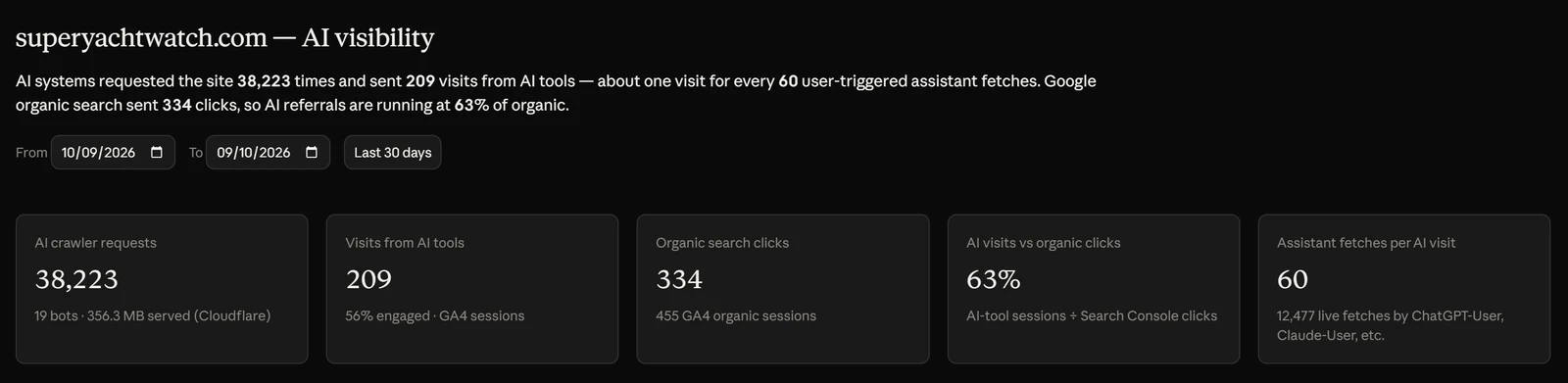
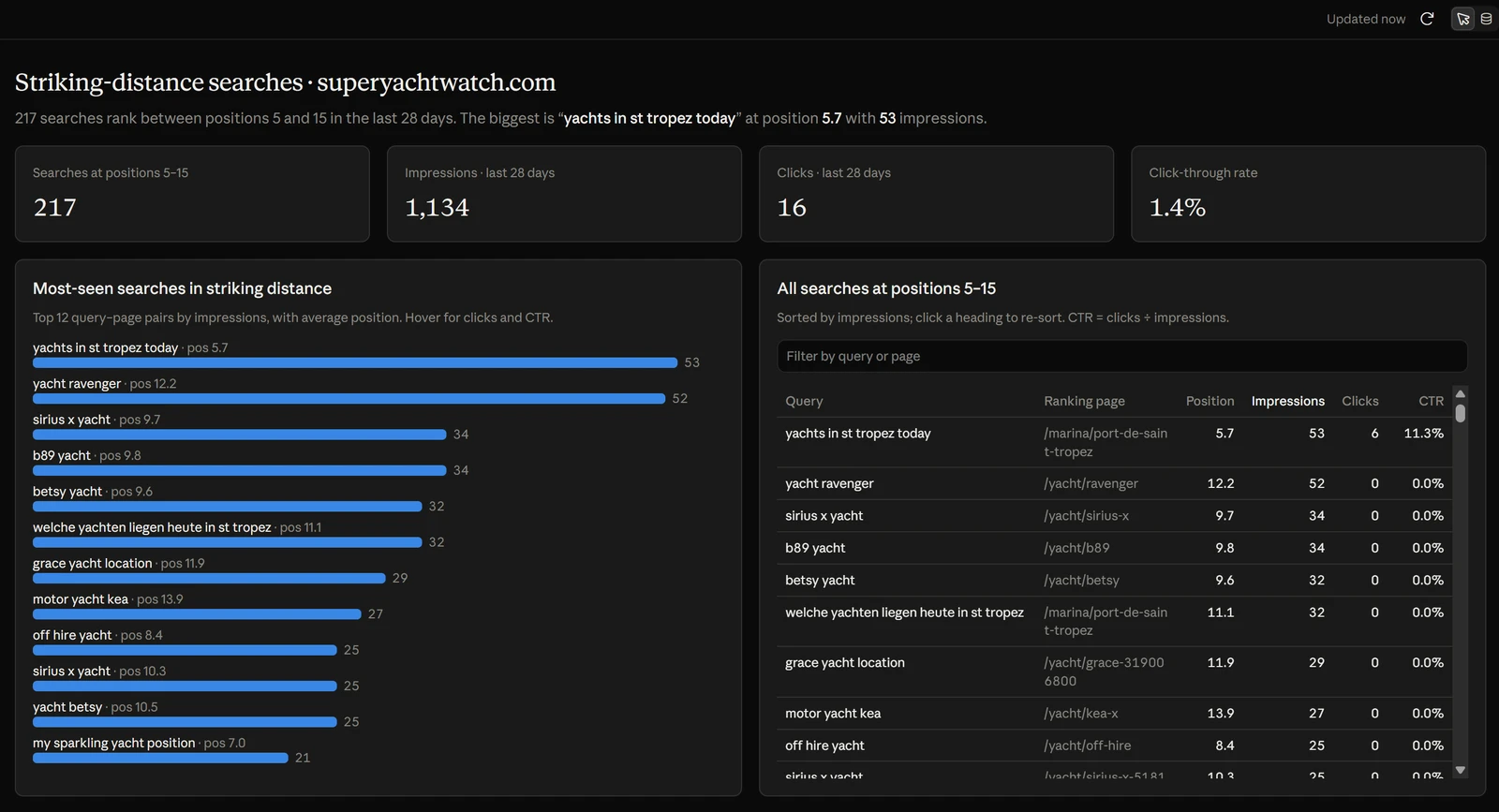
Prompts, the paid-media example and how to check every number: Build live dashboards in Claude.
On every plan
300 tool calls a month per team. Resets on the 1st of the month. Listing properties, skills and the help docs keeps working after the allowance is used.
Unlimited tool calls.
Unlimited tool calls.
Every new account starts with 30 days of Business. Compare plans.
Where the built-in chat is still better
The connector is for quick questions from wherever you already work. For heavy analysis the app’s own chat stores large results in a per-conversation database and runs real SQL over them, on the AI keys you bring. Reports, report history and sharing all live in the app.
- Connector: your client, your AI subscription, every property, your permissions
- Built-in chat: exact numbers over large result sets, charts, reports and scheduling
- Neither can change anything in your connected platforms
Questions
Do I need a Google Cloud project or my own MCP server?
No. AI Data Stream hosts the server and holds the Google connections. You add one URL to your client and sign in, or paste a personal token.
Which clients work?
claude.ai, Claude Desktop and Claude Code can sign in with your AIdata account. Cursor and any other client that supports remote MCP servers connect with the personal token, sent as an Authorization header or built into a connection URL for clients that only accept a URL.
Does it use my AI API key?
No. Requests through the connector are covered by whichever AI subscription your client already runs on. The built-in chat in the app is where your own API keys are used.
Is it only Google Analytics?
No. Your AI gets the same tools as the built-in chat for every source a property has connected: GA4, Search Console, PageSpeed and Core Web Vitals, Google, Meta and LinkedIn Ads, Tag Manager, Cloudflare, sitemap history, WordPress, GitHub, HubSpot, Pipedrive and DataForSEO, plus annotations, the knowledge base and your skills.
What can it change?
Only things inside your AIdata workspace, and only where you have write permission: custom annotations, team memories and to-dos. It can never change Google Analytics settings, edit campaigns or touch your WordPress site.
Can a team owner switch it off?
Yes. External AI Access in Team Settings is the master switch for the whole team. Turning it off removes that team’s properties from every member’s connector at once; turning it back on restores them.
What happens when a Free team uses its 300 calls?
Data tools pause until the 1st of the next month. Listing properties, skills and the help docs still works, and the owner can see the month’s usage in Team Settings. Pro and Business have no limit.
Do some tools cost money?
DataForSEO lookups are billed to the DataForSEO account of the team that owns the property. The AI is told to say which property’s connection it is using whenever it looks up a domain that is not that property’s own site, and connection admins can restrict lookups to specific domains.
Is this the same as the MCP server on this website?
No. aidata.stream/mcp is a public, read-only search server for the pages of this website. The connector described here runs at app.aidata.stream and gives your AI access to your own analytics data.
Launch history
- Shipped Connector on every plan, Free with 300 tool calls a month
- Guide Building live dashboards in Claude from the connector
- Shipped External AI access launched
Page last updated .
Connect your AI to your analytics
Create an account, connect GA4 and Search Console, add the connector to your client. Thirty days of Business included.