Can AI Run Your Campaigns? We Let Claude Change Tag Manager and Google Analytics
Our connector only reads your data. So we gave Claude a browser too and let it fix what it found in Tag Manager and Google Analytics, approving each save ourselves.
People ask us whether AI Data Stream can run their campaigns for them. The honest answer about our connector is no: it reads your analytics and ad platforms and can never change anything in them. The only things it writes are its own notes: annotations, team memories and the to-do list.
That is deliberate, and it turns out not to be the end of the story. An AI client can hold two tools at once. One reads the data and works out what is wrong. The other is a browser, and a browser can click Save.
This week we spent a session doing exactly that on our own accounts. This post is what happened, including the parts where a person had to step in.
The setup
- Claude Code running Claude Fable 5.2, in a terminal.
- The AI Data Stream connector, for reading Google Analytics, Search Console, Tag Manager and our ad accounts. It is available on every plan; Tag Manager and the ad platforms need Pro.
- Claude in Chrome, Anthropic’s browser extension. It lets Claude click and type in the Chrome you are already signed in to, in a tab group of its own that you can watch.
Nothing was installed on the Google side and no extra API access was granted. The connector kept its read-only access, and the browser used ours.
Example 1: a tag that never fired after consent
We started with a plain question: is our cookie banner stopping Tag Manager from loading?
Claude read the site code, confirmed the container loads on every page, then listed the container’s tags through the connector. That turned up something we had not asked about. Our X pixel is set to wait for advertising consent, and it fires once, when the page starts. A visitor who clicks Accept a few seconds later has already missed it. The banner announces the choice with an event, but nothing in the container was listening for that event.
So the diagnosis came from data: the tag list, the trigger list and the consent settings, all read through the connector.
The fix needed the Tag Manager interface. We said so, and Claude opened the container in Chrome, created a Custom Event trigger for the banner’s event and attached it to the pixel tag.
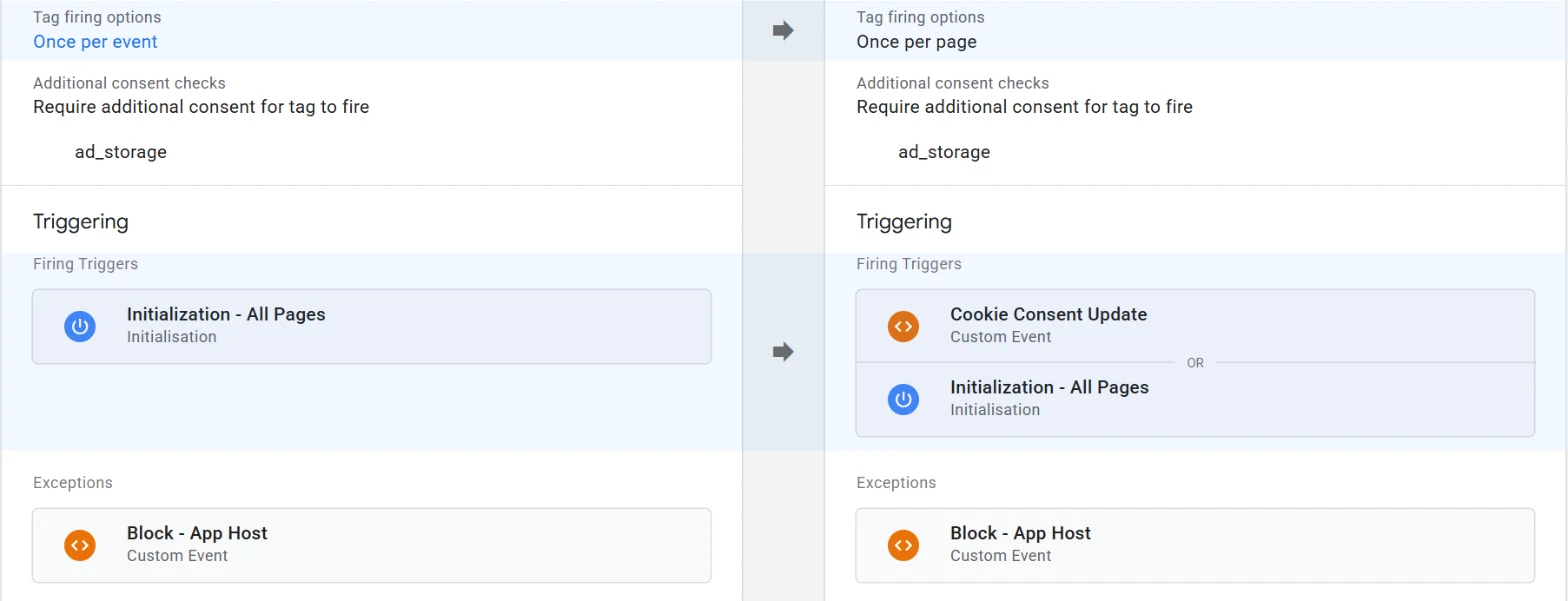
Then it stopped. The permission check in Claude Code refused the Save click, because saving a change in a connected account was more than we had spelled out. Claude said what was filled in and what was left, and we clicked Save and Submit ourselves.
Afterwards Claude went back to the connector and read the container again: a new live version, the tag firing on both triggers, set to fire once per page. The tool that cannot write is the one that confirmed the write.
Example 2: remarketing lists that had been empty for months
Later we asked whether our ad creatives could be reused for display remarketing. That depends on how many past visitors Google Ads can reach, so Claude checked the audience sizes in Google Analytics through the connector. The three audiences we built in August held 7, 12 and 3 users. None of them covered the landing pages our ads point at.
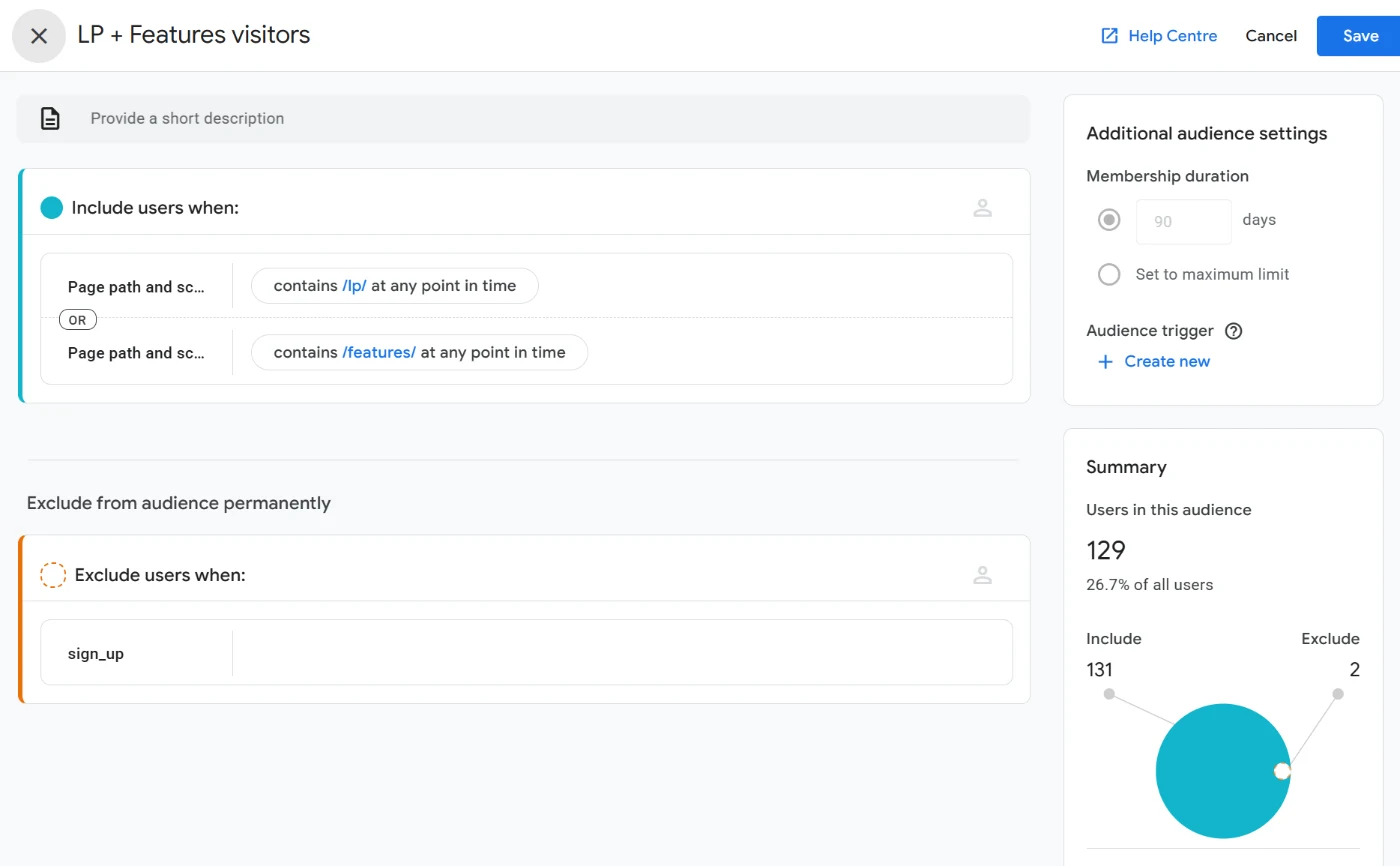
This time we told it to go ahead in the browser. It built a new audience in Google Analytics: anyone who viewed a landing page or a feature page, kept for 90 days, with people who have signed up excluded. The builder estimated about 130 matching users.
We then asked it to look in Google Ads. In Audience Manager every audience from Google Analytics showed a size of zero, including the default list of all users.
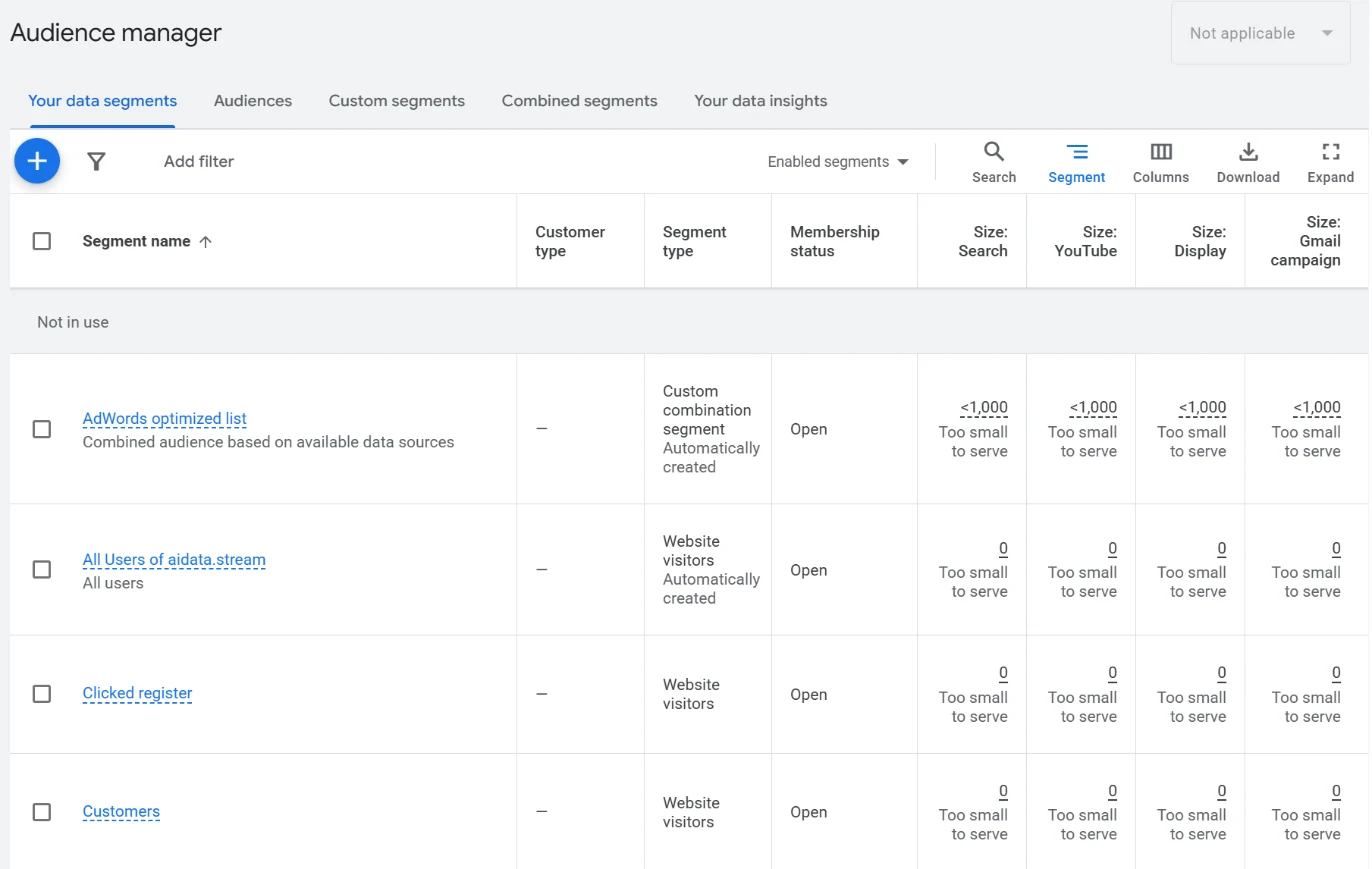
Claude went looking for a cause and found that Google signals was switched off in our Google Analytics property. It did not turn it on. It told us it was a privacy setting, what it does, and that our privacy policy did not mention remarketing. We said to turn it on, it did, and it updated the policy in three languages for us to review.
We do not know yet whether the lists will fill. Claude added a to-do to check the sizes next week, which is one of the few things the connector is allowed to write.
What the person still did
- Approved every change. Each save was either clicked by us or explicitly asked for. When we had only said “you can do that in the browser”, the save was refused.
- Published. The Tag Manager change went live when we pressed Submit.
- Made the judgement calls. Turning on a setting that links visits to Google accounts was our decision, with the trade-off laid out first.
- Corrected it. Claude read our “claude dashboard” search traffic as the wrong audience. It is not: building dashboards in Claude is one of the things people use the connector for.
Where the browser was clumsy
Reading through the connector is fast and exact. Clicking through an admin interface is neither.
- A suggestion list slid under the pointer as Claude clicked Apply, so a filter read
/lp/traffic-drop/instead of/lp/. It saw the wrong value in its next screenshot and fixed it. - A stray keystroke flipped the audience’s membership from 30 days to the maximum. It noticed, and set it to 90.
- Google Analytics opened on a different property from the one we meant. Claude checked the name before touching anything.
None of these reached a saved change, because it looks at the screen after every step. They are still the reason we would not leave it unattended in an ad account.
Why the connector stays read-only
It would be simpler to give the connector write access to your ad platforms. We think the split is better.
Read access can be always on. It is what lets an AI answer a question at any time, from any client, without you watching. A change to a campaign or a tag is different: you want to be present, see the screen and say yes. A browser you are sitting in front of gives you that for free, and it works with every platform’s own interface, permissions and change history.
So the connector supplies the evidence, and the change happens where you can see it.
So, can AI run your campaigns?
It can do the work of running them: find the problem in the data, open the right screen, fill in the change and check afterwards that it took effect. In our session it did not decide anything on its own, and we would not want it to.
If you want to try the same thing, add the connector to your AI client, give that client a browser tool, and start with a question, not an instruction. The useful changes in our session were ones we did not know to ask for.
Related Posts
Build Live Dashboards in Claude from Google Analytics, Search Console, Ads and More
Claude can now build live dashboards. With the AI Data Stream connector it builds them from every source you have connected: Google Analytics, Search Console, ad platforms, your CRM, Cloudflare and more. Here are real examples, the prompts we used, and how to check every number.
Connect Your Own AI to Your Analytics Data
One personal URL connects Claude - or any MCP-compatible AI - to every property you can access: Google Analytics, Search Console, Ads, CRM data, and your skills. No API key required.
How System Prompts Work - And Why They Matter for AI Analytics
The system prompt is the difference between an AI that hallucinates plausible nonsense and one that stays grounded in your actual data. Here's how they work, and what good analytics prompts look like.